Delete an Inspection Type
Objective
To delete an inspection type so it will no longer appear in the drop-down menu when selecting an inspection type.
Things to Consider
- Required User Permissions:
- 'Admin' level permissions on the Company level Inspections tool.
- Additional Information:
- An inspection type can not be deleted if it is tied to any of the following: a company template, project template or inspection.
- You will be able to delete an inspection type if it is only associated with a template in the recycle bin. See What is Procore's Recycle Bin?
Prerequisites
Steps
- Navigate to the Company level Inspections tool.
- Click the Configure Settings
 icon.
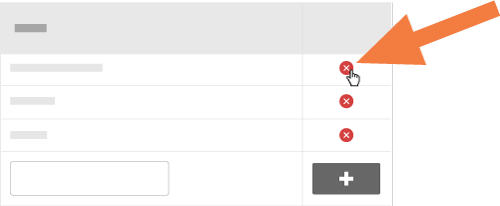
icon. - Click the red X next to the inspection type you would like to delete.
See Also
If you would like to learn more about Procore's inspections management software and how it can help your business, please visit our construction site inspection software product page  .
.
.