View Budget Change Detail for a Budget Line Item
Objective
To view the budget change details for a line item on your project's budget.
Background
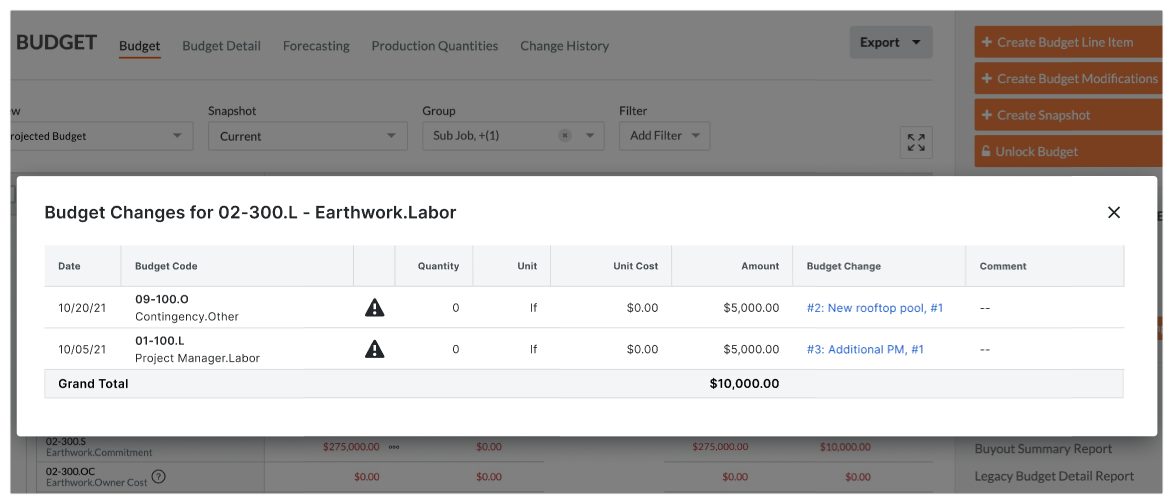
While viewing a budget, you can view the budget change details in a pop-up window for a line item on your budget.
Things to Consider
- Required User Permissions:
- To view a budget change, 'Read Only' level permissions or higher on the project's Budget tool.
- To view a budget change, 'Read Only' level permissions or higher on the project's Budget tool.
- Additional Information:
- Procore recommends that your company (or each project team) develop a policy for managing budget changes in your environment.
- Budget changes are supported by the Company level Workflows tool.
- Limitations:
- Budget changes do NOT automatically populate GC/Client invoices, funding invoices, or owner invoices.
- For companies using the
 ERP Integrations tool: Show/Hide
- Only 'Approved' budget changes can be sent to Procore + ERP Integrations.
- Budget changes can be retrieved from Procore + ERP Integrations if they have not yet been synced.
- Budget changes cannot be edited or deleted once synced with the integrated ERP system.
Prerequisites
Steps
- Navigate to the project's Budget tool.
- Click the Budget tab.
- Locate the budget line item with a budget change.
- Click the value in the Budget ROM cell to open a pop-up window that summarizes the budget change details for the selected line item.
See Also
If you would like to learn more about Procore's budget management software and how it can help your business, please visit our construction budgeting software product page  .
.
.