View Tender in Portfolio Financials
Objective
To view tender in a Tender Room in Portfolio Financials.
Background
After inviting tenderers, a card is shown for each vendor on the Manage Tender tab.
Things to Consider
- Required User Permissions:
- 'Limited' access to the project or higher.
Note: Users with 'Limited' access must be on the Tender Room Team for the project.
- 'Limited' access to the project or higher.
Video
|
|
Steps
- Navigate to the relevant Tender Room.
- Click Manage Tender.
- You can view the following details on each vendor's card:
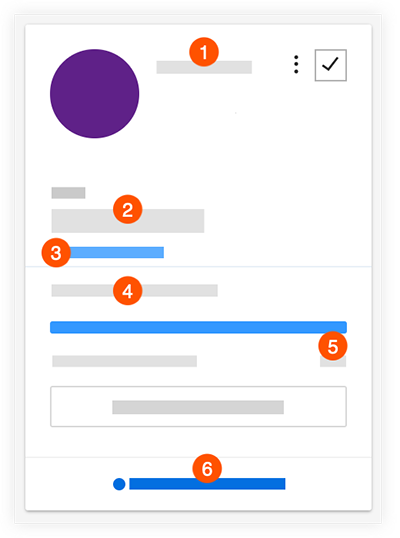
 The name of the vendor.
 The most recent bid amount.
 A link to previously submitted bids, if there were revisions.
 The percentage that the bid form is complete. Note: Fields with a value of $0 will count as "complete" towards the overall completion percentage.
 How many of the bid room documents have been downloaded by the vendor.
 To view messages and activity, click Messages and Activity. See View Messages and Activity in a Bid Room.