View Details of an Allocation Rule in Portfolio Financials
Note
The information in this tutorial applies to accounts with the Portfolio Financials product in Procore. Reach out to your Procore point of contact for more information.Objective
To view details for an allocation rule in a Portfolio Financials project.
Background
Cost Allocations allow you to allocate budgets, holds, contracts, schedule items and change orders to sub-projects called components using percentage-based allocation rules. Each component acts as a sub-project to which you can allocate and track costs. Budgets, holds, contracts, schedule items and change orders can all be assigned to components based on the percentage-based logic of the allocation rules assigned to them.
In order to allocate a percentage of each cost item to components, you must first add an allocation rule. After allocation rules are set, you can see rollups of costs for each component in the 'Components' tab. Associating cost items with cost items will allocate their associated budgets and holds.
Things to Consider
- Required User Permissions:
- 'Full Access' to the project or higher.
Steps
- Navigate to the Cost Tracker section of the Project Page.
- In the Allocation Rile column, click the dropdown menu next to a cost item.
- Click More Info next to the relevant allocation rule.
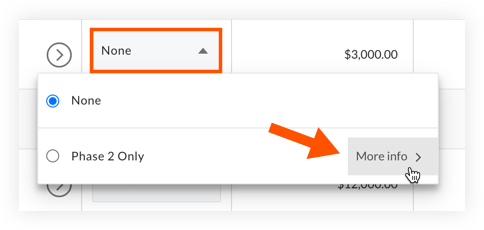
- The logic of the rule will be shown.