Save and Manage Versions of Capital Plans in Portfolio Financials and Capital Planning
Note
The information in this tutorial applies to accounts with the Portfolio Financials and Capital Planning products in Procore. Reach out to your Procore point of contact for more information.Objective
To save or manage versions of Capital Plans in Portfolio Financials and Capital Planning.
Background
When you set up a Capital Plan, you can compare costs across any number of past projects at the overall project level, all the way down to a specific line item on the Schedule of Values. Saving a version of a Capital Plan ensures that you can refer to it at any time. You can also edit or delete a saved version later on.
Things to Consider
- Required User Permissions:
- 'Building Admin' or 'Company Admin' in Portfolio Financials and Capital Planning.
Note: Only users with 'Company Admin' level permissions can save and manage 'Official' versions of Capital Plans.
- 'Building Admin' or 'Company Admin' in Portfolio Financials and Capital Planning.
- Additional Information:
- This feature requires the Capital Planning product added on to your organization's account in Portfolio Financials. Please reach out to your Procore point of contact with any questions.
Prerequisites
- Set up a new Capital Plan. See Set Up a Capital Plan in Portfolio Financials and Capital Planning.
Steps
To save a new version:
- After budgets have been established and your Capital Plan has been set up in the Planning tool, click Save New Version.

- Enter a name for the version.
Tip! We recommend using a standard naming convention for ease of reference. - Select whether the version should be marked as Official or Unofficial.
Note
Only users with 'Company Admin' level permissions can save an 'Official' version of the Capital Plan.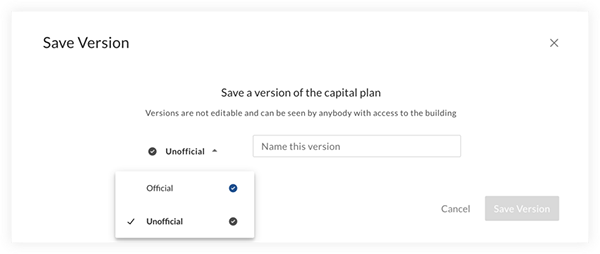
- Each version saved will be time stamped. All previous saved versions of a capital plan can be accessed and reviewed from the drop-down menu.
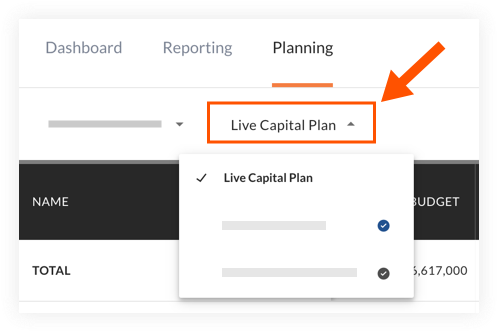
To edit a version:
- From the Planning tab, click Manage Versions.

- Hover over the version that you want to edit or delete.
- Click the vertical ellipsis
 icon and select Edit Version.
 - Make any necessary changes to the name or type of version.
- Click Save.
To delete a version:
Caution
When you delete a version of a Capital Plan, it is permanently deleted.- From the Planning tab, click Manage Versions (see image above).
- Hover over the version that you want to edit or delete.
- Click the vertical ellipsis icon and select Delete Version.
- On the confirmation window, click Delete to confirm you want to permanently delete the version.