Apply the View, Group, and Filter Options on the Budget Detail Tab
Objective
To apply the view, group and filter options on the Budget Detail tab and how to export that data to CSV or PDF.
Background
The Budget tool lets you create flexible, budget views that you can apply across multiple projects. It also provides you with a variety of filtering and grouping options for viewing your budget data. You'll also discover additional options for viewing budget data in full-screen mode, clicking hyperlinks to drill-down into your budget's detail, and the ability to export your budget view data to a Comma Separated Values (CSV) or Portable Document Format (PDF) file.
Things to Consider
- Required User Permissions:
- 'Read Only' level permissions or higher on the project's Budget tool.
- 'Read Only' level permissions or higher on the project's Budget tool.
- Additional Information:
- The 'Sub Job' filter always appears in the Group menu, even if sub jobs are disabled in Procore. To enable sub jobs, see Enable Sub Jobs for WBS.
- In Procore's WBS, the legacy 'Division' option in the Group and Filter menus is now represented by Tier 1 in the 'Cost Code' segment. For details, see Where is the 'Division' in the 'Cost Code' segment in Procore's WBS?
Prerequisites
Steps
- Apply a Budget View to Your Project
- View a Budget Snapshot
- Apply Group Options to Organize Your Data
- Add Filters to Narrow Your Data
- Export a Budget to CSV or PDF
- Additional Options
Apply a Budget View to Your Project
Navigate to the project's Budget tool. Then click the Budget, Budget Details, or Project Snapshot Status tab and select an option from the View menu. To add views to this menu, see Assign a Budget View to a Project.

Notes
- Procore offers company accounts several standard budget views. See What are Procore's standard budget views?
- Your company can create custom budget views or modify existing views. For details, see Set up a New Budget View.
Apply Group Options to Organize Your Data
- Navigate to the project's Budget tool.
- Click the Budget Details tab.
- Select one (1) or more options to apply to the table from the Group menu.
Group Menu Options
This table details the available options in the Add Group Menu.
Group Menu Options Description Important To learn more 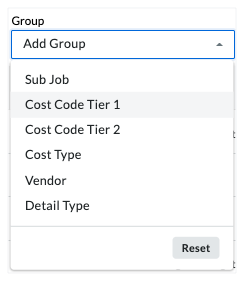
Sub Job Groups items in the table by sub job. This menu option always appears, whether or note the 'Sub Job' feature is enabled. Enable Sub Jobs for WBS Cost Code Tier Groups items by the selected tier in your 'Cost Code' segment. In Procore's WBS, the legacy 'Division' option in the Group and Filter menus is now represented by 'Cost Code Tier 1' in the 'Cost Code' segment. Where is the 'Division' in the 'Cost Code' segment in Procore's WBS? Cost Type Groups items by cost type. What are Procore's default cost types? Vendor Groups items by company/vendor To be listed as a vendor, the company record must exist in the Project Directory and associated with the budget code. Add a Company to the Project Directory Detail Type Groups item by detail type. Detail types include: Automatic Forecast, Direct Cost, Forecast Notes, Original Budget Amount. n/a
Tips
- You can apply one (1) or more Group menu options to the budget.
- To remove any or all groupings, click the x next to the selected menu option(s).
- To change the sort order of an applied filter, grab the selection by the more menu (≡), and use a drag-and-drop operation to move it to the desired position.
- To reset the group filter to the default setting for the budget view, click Reset.
Add Filters to Narrow Your Data
- Navigate to the project's Budget tool.
- Click the Budget Details tab.
- Select one (1) or more options to apply to the table from the Filter menu.
Filter Menu Options
This table details the available options in the Filter menu.
| Filter Menu | Options | Description | Important | To learn more |
|---|---|---|---|---|
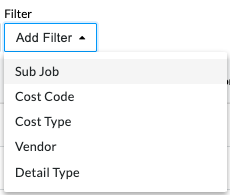 |
Sub Job | Filters items in the table by sub job. | This menu option always appears, whether or note the 'Sub Job' feature is enabled. | Enable Sub Jobs for WBS |
| Cost Code Tier | Filters items by the selected tier in your 'Cost Code' segment. | In Procore's WBS, the legacy 'Division' option in the Group and Filter menus is now represented by 'Cost Code Tier 1' in the 'Cost Code' segment. | Where is the 'Division' in the 'Cost Code' segment in Procore's WBS? | |
| Cost Type | Filters items by cost type. | In Procore's WBS, individual cost types are segment items on the 'Cost Type' segment. | What are Procore's default cost types? Add Company Cost Types. |
|
| Vendor | Filters items by company/vendor | To be listed as a vendor, the company record must exist in the Project Directory and associated with the budget code. | Add a Company to the Project Directory | |
| Detail Type | Filters item by detail type. | Detail types include: Automatic Forecast, Budget Change Adjustment, Budget Modificiation, Change Event Line Item, Commitment Change Order, Commitment Contract, Direct Cost, Forecast Item. | n/a |