View the Email Correspondence for a Transmittal
Objective
To view any email correspondence for a transmittal.
Background
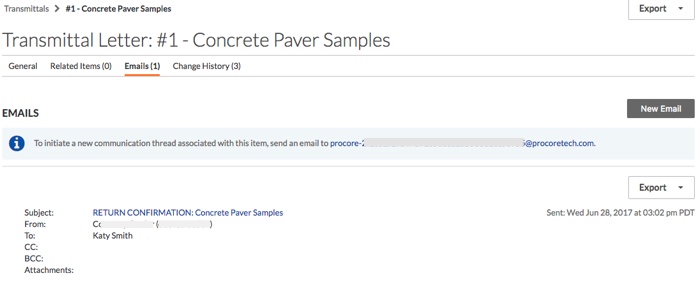
The Emails tab in the project's Transmittals tool keeps a record of the following email correspondence:
- Emails Forwards. When you follow the steps in Forward a Transmittal by Email, those email forwards are recorded in the Emails tab.
- External Emails Sent to the Email Address in the Transmittal. When you send an external email to the Transmittal's email address, that email is recorded in the Emails tab.
Things to Consider
- Required User Permissions:
- To view the email correspondence for a transmittal that you created, 'Standard' level permissions on the project's Transmittals tool.
- To view the email correspondence for any transmittal, 'Admin' level permissions on the project's Transmittals tool.
- Limitations:
- Emails sent to people via the 'Create and Email' or 'Save and Email' button are recorded in the Change History tab and not the Emails tab.
Prerequisites
Steps
- Navigate to the project's Transmittals tool.
- Locate the transmittal in the list. Then click Edit or View.
- Click Emails.
Notes:- This tab lists all of the transmittals that have been forwarded by email. See Forward a Transmittal by Email.
- It also lists all new communication threads sent to the email address highlighted in blue.
If you would like to learn more about Procore's transmittals management software and how it can help your business, please visit our construction transmittal software product page  .
.
.