Allow or Disallow Users to Create Locations within a Tool
Objective
To allow or to restrict users from creating new locations from the tools in a Procore project.
Background
Locations are typically created in the Location Manager in the project's Admin tool. Admins can choose to limit location creation to the Location Manager, or allow users to add new locations in other tools, based on a setting in the Location Manager tool.
Things to Consider
- Required User Permissions:
- 'Admin' on the project's Admin tool.
- Additional Information:
- These settings are only available if your original locations were created manually or imported.
- If your locations hierarchy was generated from drawings, locations can only be added in the Drawings or Admin tools. See Add Locations to a Project.
-
Steps
- Navigate to the project's Admin tool.
- In the 'Project Settings' menu, click Locations.
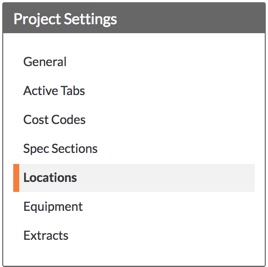
- Under 'Location Settings', select or clear the Only Allow Locations to be Created in the Location Manager Above box:
- To allow users to create locations from other Procore tools, remove the mark from the checkbox.
OR - To restrict users from creating locations from other Procore tools, mark the checkbox. This means that users with 'Admin' level permission on the project's Admin tool must use the Location Manager to create locations.
Note: Any change to this setting is saved automatically.
- To allow users to create locations from other Procore tools, remove the mark from the checkbox.